
Devices
Devices are the machines your flows act on - routers, switches, servers. Each device records how to reach it (management host, port, transport) and which credentials to use, always as references to secrets, never as stored passwords.
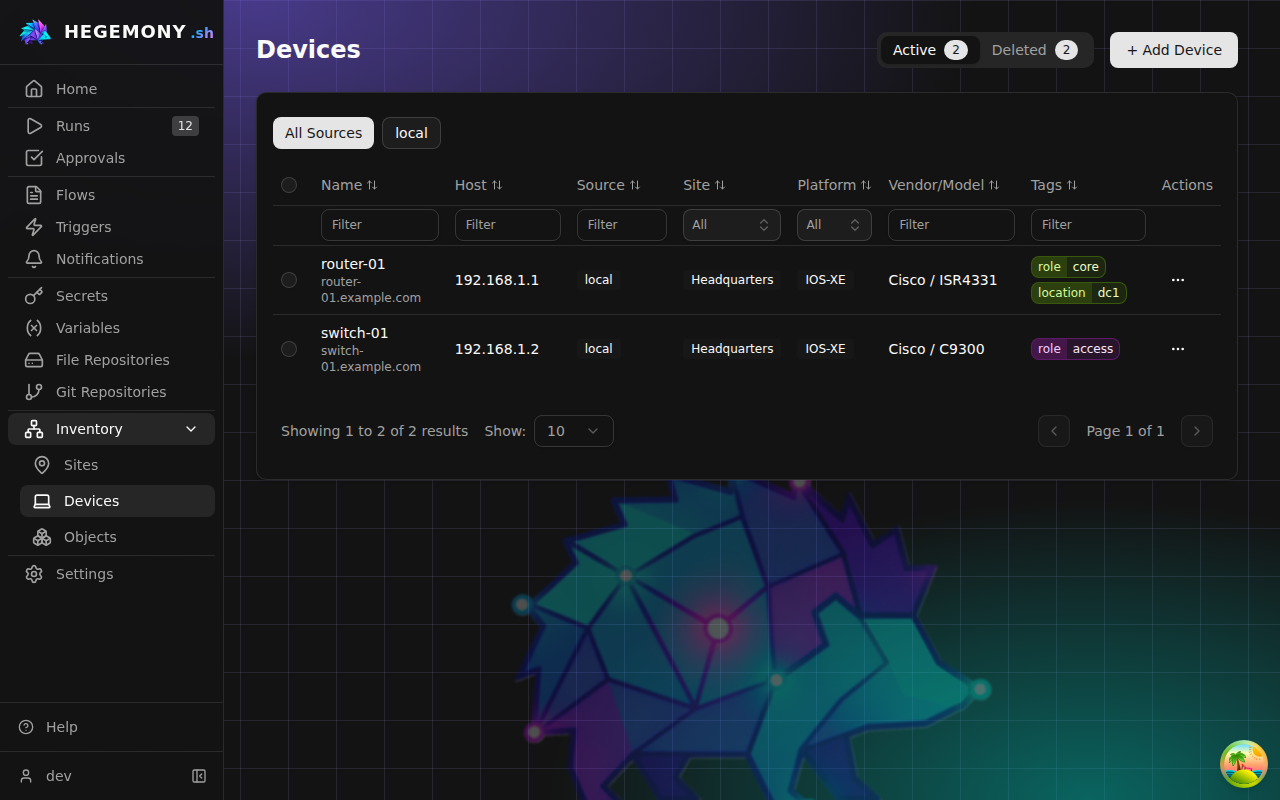
Add a device
- Open Devices and click Add Device.
- Fill in the identity: Device Name, Platform (for example
ios-xe,junos- free text, used to pick the right behavior in CLI steps), and Management Host (IP or DNS name; port defaults to 22). - Optionally assign a Site, add Tags (
key=value, for examplerole=core), and recordvendor,model, andcurrent_versionin Inventory attributes.
Names follow the platform's object name rules: trimmed, not blank, at most 128 characters, no word longer than 64, and no control characters.
Access configuration
Credentials are configured as secret references, so the device stores where the credential lives, not the credential itself:
- SSH Username Ref / SSH Password Ref / Enable Password Ref - template references such as
{{ secret('vault://devices/ssh/username') }}. - SSH Private Key Ref - for key-based login, for example
{{ secret('vault://devices/ssh/private_key') }}. Used by shell steps (shell.execute) only: the network-CLI transports authenticate with the password, and the worker logs a warning when a device carries a key ref they cannot use. - SSH Transport - which device-transport plugin CLI steps use; Platform default (netmiko) suits network gear, other transports (for example asyncssh) suit Linux hosts.
Use the braces button next to each field to pick secrets from the Variable Picker instead of typing references by hand. See the secrets guide for creating the secrets these references point to.
Jump host (bastion)
If the device is only reachable through an SSH hop, fill in the Jump host section: host, port, and credential references for the bastion. The bastion authenticates separately and never sees the device credentials. Leave Jump Host empty for a direct connection.
Inventory attributes and relationships
The device page separates Connection, Attributes, Relationships, and Local controls and tags. Source, site, lifecycle state and freshness appear in the overview; UUIDs and timestamps are under Identity and synchronization details.
Local devices support custom attributes without a database or plugin schema change. In the device editor, choose Add attribute, enter a unique name, select a type (string, number, boolean, object, array or null), and enter its value. Objects and arrays use JSON. Attribute names cannot be blank. Local attributes are limited to 256 KiB of JSON and 12 nested levels. Credentials belong in access configuration, using references, rather than in inventory attributes.
The attributes view supports search, hiding empty values, and an expandable raw JSON view. Vendor, model and the inventory-reported software version use the same attribute editor as other facts. Imports put them under attributes; there are no top-level aliases. Existing database values are migrated automatically. The reported version is an inventory fact: IOS-XE upgrade preflight reads the running version from the device itself.
Provider devices show attributes and relationships from their explicitly linked stored inventory object. These facts are read-only; use Open in provider to change the source or Source inventory object to inspect its full inventory record. Synchronization updates the linked facts without overwriting local tags or maintenance overrides. Devices from providers without an object projection continue to expose their existing connection and standard inventory fields.
Duplicating a provider device creates an independent local copy of its attributes, without retaining the source-object link. Local device attributes and additional management addresses round-trip through single-YAML and exploded-platform configuration exchange. Omit attributes in an API update to keep them, or supply attributes: {} to clear them.
Run targets snapshot inventory facts under attributes, relationships under relationships, and effective tags under tags, alongside hostname and management addresses. Steps can read, for example, device.attributes.asset_tag; the custom namespace never overrides mgmt_host, platform or access_config. These facts are captured at run creation, so later inventory edits do not change that run's inputs. Credential references stay in access_config and are resolved by the worker when used.
Targeting devices in runs
When you start a run, device-target fields filter the inventory by site (optionally with child sites), source, platform, vendor, and tags - the standard fields and tags are available as picker filters; custom attributes remain available in the device detail and run snapshot. See running flows.
Provider-sourced and shared devices
Devices imported by an inventory provider carry a source badge and are read-only - update them in the provider or Duplicate them into an editable local copy. A Stale badge means the provider has not seen the device in its latest sync. When the provider supplies a link to its own page for the device, an Open in provider link appears beside the source badge.
A Maintenance or Disabled badge means the source of truth reports the device as not in service. Which of the provider's own statuses produce which badge is decided by the provider plugin, not here - the NetBox plugin, for instance, ships a default mapping you can change in its configuration - so check your provider's documentation for the exact list. A provider that says nothing about a device's lifecycle leaves the state as it is.
The state has one owner at a time. Normally that is the provider: every sync writes its opinion into the device's state. A local override takes precedence while it is set - the sync then leaves the state alone and only records the provider's opinion beside it (as descriptive.provider_maintenance_state), so clearing the override puts the provider's state back at once rather than after the next sync. The badge reads (local override) while one is in effect.
The badge is informational: the device is still selectable, and nothing stops a run against it. Filter on it with ?maintenance_state= on device search, or with a maintenance_state filter on a run form's device picker. Stale devices filter the same way, with ?sync_status=stale (or active) on device search and a sync_status filter on the picker, and the picker's options carry both states so a form can show why a device deserves a second look.
Devices from the shared organization (badge Shared) are read-only in the same way.
Tags on a provider-sourced device
Such a device carries two sets of tags. The provider's own tags are refreshed on every sync, so anything you change upstream shows up here within one sync interval. Beside them sits a local overlay, which the sync never writes - it is where a fact you know locally can sit without a sync erasing it half an hour later. Where both name the same key, the local one wins; an empty overlay simply means there is nothing local to say, and you see the provider's tags unchanged.
The overlay is set from the device's page (the Local overlay card in the source banner, for anyone who may annotate devices) or with PATCH /devices/{device_id}/overlay, which also carries the maintenance-state override described above. It is the one write a provider-sourced device accepts; everything the provider reports stays read-only. Overlays are local facts about a local row and do not travel in Configuration Exchange bundles.
Search, the run form's device picker and the local inventory provider all read the same effective tags: the provider's map with the overlay applied key by key. With provider tag role=core and overlay role=edge, a tags[role]=edge filter finds the device and tags[role]=core does not; a key only the overlay names (rack=r1) matches like any other. Duplicating the device copies the effective tags.
Bulk actions, delete, and restore
Select devices with the checkboxes for bulk deletes. Deleted devices move to the Deleted tab where they can be restored or permanently removed.
Related
- Sites - the hierarchy devices are assigned to.
- Connectivity monitoring - watch device reachability during runs.