
Git Integration
Overview
Git Integration lets you connect Hegemony flows to a Git repository so that flow definitions and their attachments are version-controlled externally. You can push local changes to Git, pull remote changes into Hegemony, and have commits pushed to Git automatically in synced mode.
The name you give a registered repository follows the platform's object name rules; it is a label for the Hegemony record, independent of the remote's own name.
Quick Start
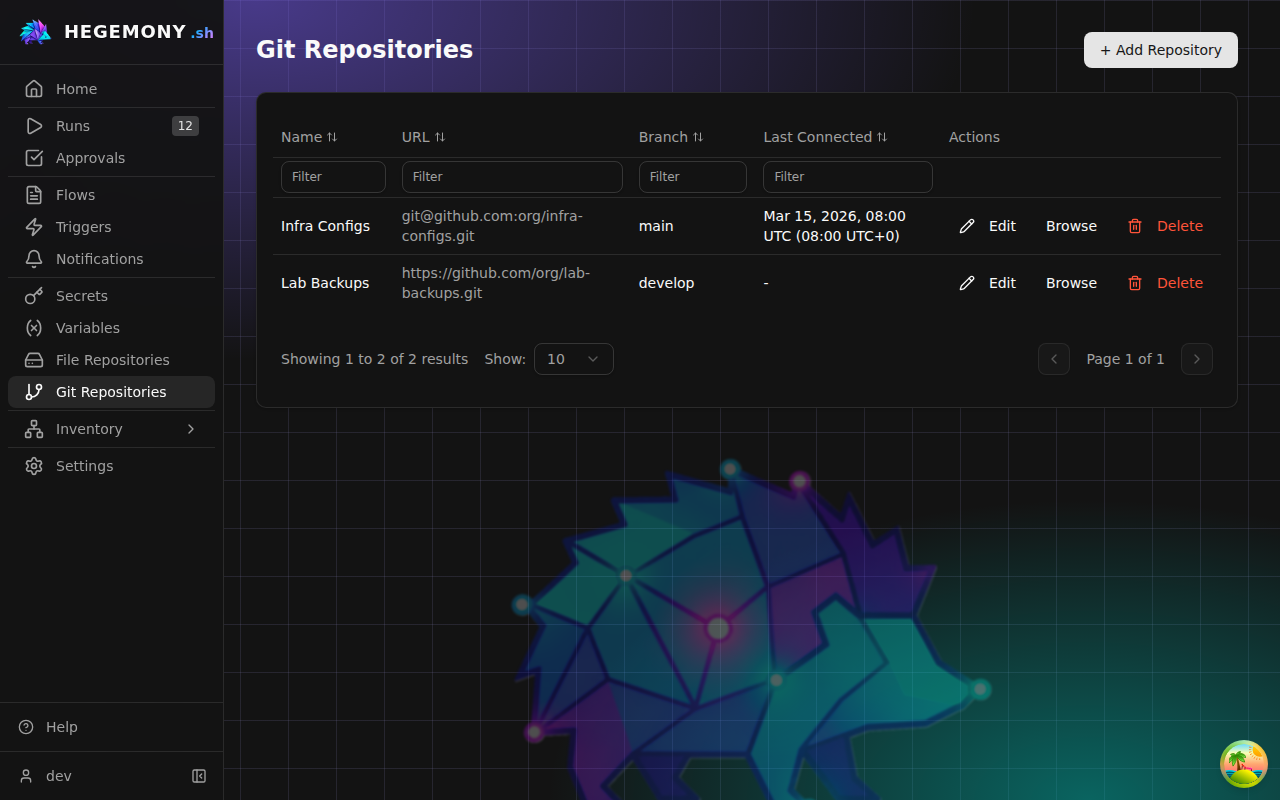
1. Register a Git Repository
- Navigate to Settings → Git Repositories from the sidebar.
- Click Add Repository.
- Provide:
- Name — a human-readable label.
- Remote URL — HTTPS (
https://…) or SSH (git@…). - Default branch — e.g.
main. - Credentials — select a stored Secret Reference for SSH key or token, such as
{{ secret('vault://orgs/acme/secrets/git/token') }}.env()andfile()are refused here: the API resolves these refs and sends the result to the remote, so they may not read the platform's own credentials.
- Click Test Connection to verify access.
- Click Save.
2. Export a Flow to Git
- Open a flow's detail page.
- Click Export to Git.
- Select the target repository, branch, and path prefix.
- Optionally check Link after export to establish a permanent git linkage.
- Click Export — Hegemony writes the "exploded" YAML format, commits, and pushes.
3. Link a Flow to Git
After exporting (with linkage) or by configuring git settings on the flow:
- Open the flow's Git panel.
- Set the Sync Mode (see below).
- The flow is now linked — pull/push operations are available.
Sync Modes
Each linked flow has a sync mode that controls how changes flow between Hegemony and Git.
| Mode | Direction | Description |
|---|---|---|
synced | Bidirectional | Changes are pushed to Git on commit and can be pulled back. The default for newly linked flows. |
readonly | Git → Hegemony only | The flow is read from Git. Local edits are blocked by the UI (pull-only). |
detached | None | The linkage metadata is preserved but no automatic sync occurs. Useful for temporarily pausing sync. |
Changing Sync Mode
On the flow detail page, open the Git panel and select a different mode from the dropdown. The change takes effect immediately.
Pull Sync (Git → Hegemony)
A pull reads the flow definition and attachments from the linked Git path and updates the Hegemony draft.
Per-flow pull
- Flow detail page → Git panel → Pull from Git.
- If the local draft has unsaved changes that conflict with the remote, a dirty-draft conflict is shown. You can choose to overwrite or cancel.
Repository-wide pull
- Settings → Git Repositories → select a repo → Sync.
- Pulls all linked flows in that repository. A summary shows how many flows were updated, skipped, or had conflicts.
- Sync only reads flow definitions for flows linked to the repository; detached flows are skipped. With no such flows it has nothing to do. It is not the way to update what Browse shows; use Refresh there (see Browsing a repository).
Push Sync (Hegemony → Git)
A push writes the current committed flow version to Git in exploded format.
Manual push
- Flow detail page → Git panel → Push to Git.
- If the remote branch has advanced since the last known commit (
stale-remote), Hegemony reports a conflict. The operator can retry with the force flag to overwrite the remote, or pull first to reconcile.
Automatic push on commit (synced mode)
When a flow with sync_mode = synced is committed through the UI or API, an async push is enqueued automatically. The push runs in the background via the API's sync dispatcher.
Bulk export
- Settings → Git Repositories → select a repo → Export All Flows.
- Exports every flow linked to that repository.
Sync History
Every pull or push operation creates a sync history record. View it:
- Per flow: Flow detail → Git panel → Sync History tab.
- Per repository: Settings → Git Repositories → select a repo → Sync History.
Each entry shows: direction (pull/push), status (queued/running/success/failed), trigger source, timestamps, commit SHA, and error detail if failed.
Every finished pull or push is also written to the audit log as entity.git_pulled or entity.git_pushed on the flow, whatever the outcome: one that changed the draft, one skipped as already up to date, one refused because the draft had unsaved changes, and one that failed are all recorded. The entry carries the commit identifiers, the sync status, and the trigger, so where a flow's definition came from can be answered after the fact. It is written independently of the request, so an operation that raised is recorded too.
The repository's own page also carries a History card listing the most recent audit entries about the repository row itself, separate from the sync history above: who registered it, who changed its branch or credentials, and who removed it. It appears only for callers who may read the audit log.
Browsing a repository
Settings → Git Repositories → select a repo → Browse shows the files on the repository's branch, whoever wrote them: Hegemony's own pushes, a flow step that runs git push, or a person.
Browse reads from a copy of the branch that the API keeps on disk, and fetches from the remote again when that copy is more than five minutes old. A commit pushed in the meantime is not shown until then. Refresh fetches the branch now. The short commit ID next to the branch name is the commit being shown.
Exploded Format
Hegemony stores flows in Git as a directory tree ("exploded format"):
<path_prefix>/<flow_slug>/
  flow.yaml            # Flow metadata + graph definition
  attachments/
    config-template.j2 # Flow attachments (by filename)
    validation.py
flow.yaml carries the flow's name, description, tags, whether it is pinned, whether it accepts manual runs, and its graph definition. Those three travel outward only: a push writes them into the file, and a pull leaves the local ones as they are - the same treatment the name and description get, because how a flow list is grouped and ordered, and who may start the flow by hand, are local decisions rather than something the repository dictates. The manual-run switch is written only when it is off, so a flow nobody restricted exports the file it exported before the switch existed. A bundle importing a flow that does not exist here yet does honour what the bundle says, which is how a deployment can arrive with its library flows already closed.
Step tags are part of the graph definition and travel both ways: each step carries its tags map, and the conventional phase and kind are entries of that map, not fields of the step. flow.yaml files written by earlier Hegemony versions put phase: and kind: (or a labels: map) on their steps; a pull upgrades them into tags - an explicit tags entry wins, then labels, then phase/kind, and the old keys are dropped - the same way it promotes the old ui sub-dict and sheds edge ids, and the next push writes the current shape. The upgraded map is held to the same rules the editor applies (at most 12 tags, identifier keys, printable values): a file whose step breaks them is refused at pull time, naming the step, rather than imported and failed at its first run. Only the pull and bundle importers do this upgrade; a step sent to the API with phase, kind or labels as a field is refused. The comparison that decides whether a pull changed anything is made in the upgraded shape, so a file still written the old way reads as unchanged against the live flow it describes - it does not show up as a definition change, or an auto-committed version, on every pull.
This layout is human-readable, diff-friendly, and lets you edit flows directly in your IDE or through Git workflows (PRs, code review, CI).
Async Push Dispatcher
The API runs a background dispatcher loop that processes queued push operations. This ensures pushes don't block the user's commit action. If a push fails it is marked failed in sync history and can be retried from the UI.
Security Notes
Credentials are stored as Secret References and resolved just-in-time, confined to the repository's own organization. They are never logged or exposed in API responses, and
env()/file()refs are refused (see Platform-only references).URL validation: only
https://andgit@URLs are accepted. Private/loopback addresses are rejected to prevent SSRF.Path traversal: the exploded format reader rejects symlinks and paths that escape the repository root.
Branch names must satisfy
git check-ref-format --branchand the server-side validator, which is slightly stricter.--branchalready forbids a leading-,*,?,[,~,^,:,\, ASCII control characters and any path component ending in.lock; note the genericgit check-ref-format(without--branch) is more permissive and accepts a leading-, so it is not the rule that applies here. On top of that the server rejects all whitespace, including Unicode spaces such as U+00A0 that git itself allows in a ref.The branch names a directory in the server-side clone cache, which is why a name outside these rules is rejected rather than normalized: trimming one silently would let two different refs --
mainandmain<U+00A0>-- share a single cache entry. Validation runs against the normalized name, so a rule cannot be evaded by a spelling that normalization rewrites.
Troubleshooting
| Symptom | Cause | Fix |
|---|---|---|
| "Test Connection" fails | Bad credentials or unreachable remote | Verify the secret reference and network access. |
| Pull reports "dirty draft" conflict | Local uncommitted changes differ from remote | Commit or discard local changes, then retry. |
| Push reports "stale remote" | Remote branch advanced since last sync | Pull first, then push. |
Async push stuck in queued | Dispatcher not running or API restarted | Check API logs; the dispatcher resumes on startup. |
| Browse does not show a file that was just pushed | Browse reads a copy of the branch that can be up to five minutes old | Click Refresh on the Browse page. |
| "URL not allowed" on repository create | Private IP or unsupported scheme | Use a public HTTPS or SSH URL. |